iClicker Student
- 1.3
- Rating
- 500.00K
- Installs
- Free
- Price

 Analysis by App-foxy
Choosing a classroom response app sounds simple until you are sitting in a lecture, trying to answer a poll before the instructor moves on. I tested iClicker Student with that exact situation in mind: not as a general study tool, but as a focused way to respond to questions during class. The important distinction is that this is not a replacement for a note-taking app, a flashcard system, or a full learning platform. Its purpose is narrower and more practical: it gives students a way to participate in classroom polls from an Android device.
That narrow purpose is both its main strength and its biggest limitation. If your instructor already uses the iClicker system, the app can be more convenient than carrying a separate response device. If your classes do not use compatible classroom polling, however, there is very little reason to install it. My overall view is therefore conditional rather than enthusiastic: iClicker Student is useful when it matches the way your class is taught, but it is not an education app I would recommend universally.
How I would decide whether iClicker Student fits my classes
The first question is not whether the app looks good or whether it has enough downloads. The first question is whether your instructor expects students to respond through iClicker. The developer, Macmillan New Ventures, positions it for classroom participation, and the app was formerly known as iClicker Reef. That history matters because a student may encounter either name in course instructions, an instructor’s slides, or older classroom guidance. Seeing “Reef” in a reference does not necessarily mean you are looking at an unrelated product.
You May Also Like

 Blood Strike: 2.5 Anniversary
Blood Strike’s Loadouts Turn Every Drop Into a Tactical Gamble
A close look at Blood Strike’s custom loadouts: how fast access to signature weapons reshapes its battle royale rhythm, rewards preparation, and narrows the gap between fights.

 Pandora - Music & Podcasts
Pandora’s Music Is Easy to Start, but Harder to Recover
Pandora’s strength is its low-effort path from a seed to a station. Its weak spot is how much confidence it asks you to place in connection, setup, and quiet recovery.

 8 Ball Pool
 Is Built on Rivalries, Rematches, and Routine
A close look at the rivalries, rematches, shared routines, and unanswered safety questions that turn a quick pool match into a persistent mobile community.

 Samsung Music
’s Quiet Strength Is Playing What You Already Own
Its reach comes less from spectacle than from dependable access to a personal library. That simplicity is both the app’s strongest retention engine and its ceiling.

 AccuWeather: Weather Radar
AccuWeather Review: A Quick, Clear Forecast for Everyday Decisions
For everyday plans, the best forecast is the one you can understand quickly. AccuWeather makes rain timing, radar, and local conditions easy to act on, with a few trade-offs.

 Hill Climb Racing
Why Hill Climb Racing Still Turns Crashes Into One More Run
A tiny car, a bumpy hill and one more upgrade: Hill Climb Racing keeps resurfacing because its simple chaos makes every near-miss feel personal.
More From Our News Desk



I would also check the platform before committing to it. The current version is 8.2.0 and requires Android 8.0 or later. For someone using a reasonably recent Android phone, that requirement is unlikely to be a serious obstacle. It is still worth checking before the first class, especially if you use an older device or rely on a spare phone. A response tool is only helpful if it opens reliably when the instructor starts a poll.
The app is free to install, though in-app purchases range from $5.99 to $49.99 per item. That makes the word “free” worth treating carefully. You can begin without paying for the download, but your eventual cost may depend on how your institution or course handles access. I would not assume that installing the app alone settles the financial side. Before class begins, I would look at the course instructions and confirm whether access is included, purchased separately, or handled through a class arrangement.
The public reception also deserves a realistic reading. iClicker Student has an average rating of 1.3 from around 2.2 thousand ratings, with 653 written reviews, despite having more than 500 thousand installs. Those figures do not tell me that every student has the same experience, but they do signal that reliability, setup, or account-related friction may matter to some users. I would treat the app as something to test before an important graded session, not something to install moments before walking into an exam review.
The classroom context matters more than the app category
Many education apps are useful on their own. You can open a language program, a revision tool, or a digital textbook whenever you want and get value without another person coordinating the experience. iClicker Student is different. Its usefulness depends on a live classroom workflow: an instructor asks a question, opens a response window, and expects students to submit an answer through the supported system.
That dependency changes the decision. A student taking large lectures may benefit more than someone in a small seminar where questions are answered through conversation. It may be especially practical when the instructor uses frequent polls to check understanding, gather opinions, or keep a large room involved. In a discussion-heavy class, the app may add little because raising your hand or speaking directly is faster and more natural.
I would also separate participation from learning. Responding to a poll can make me pay closer attention, but the app itself is not a complete revision environment. It should not be judged as though it were a digital notebook or a course management system. Its job is to make a particular classroom interaction possible, and that is the standard I would use when deciding whether it earns space on my phone.
Where the app is most useful in everyday student life
The strongest use case is a large lecture where the instructor wants an answer from everyone, not just from the few students willing to speak. Imagine arriving with your phone already charged, joining the class session, and seeing a question appear during a lecture on a difficult concept. Instead of waiting for a microphone or trying to catch the instructor’s attention, you can respond from the device already in your hand. That reduces the social barrier to participation and gives the instructor a broader sense of what the room understands.
There is a less obvious benefit in that workflow: the app can turn passive listening into a series of small decisions. When I know a poll may appear, I pay more attention to definitions, examples, and changes in the instructor’s emphasis. That does not make the content easier, and it does not guarantee that my answer is correct, but it gives the lecture a rhythm. For students who drift during long presentations, that regular expectation can be genuinely helpful.
Another useful situation is a class where the instructor uses questions to expose misunderstandings before moving on. In that setting, the value is not simply submitting an answer. It is the speed of collecting responses from a room full of people. A verbal question may produce only the most confident answers, while a digital poll can make it easier for quieter students to participate. I would still remember that the quality of the experience depends heavily on how thoughtfully the instructor uses the polls.
There is also a practical advantage over a dedicated response device: your phone is already familiar. You do not need to learn a separate physical keypad or remember to bring another object to every lecture. That convenience is meaningful for students who move between buildings, study in different rooms, or already carry too much equipment. The trade-off is that a phone can also be distracting. A device that lets you answer a poll can just as easily pull you into messages or unrelated apps.
Three habits that make the experience less fragile
My first recommendation is to complete the setup before the first live class. Do not wait until an instructor announces a poll. Open the app, review the course instructions, and make sure you understand how your class expects students to participate. This is a small step, but it separates a classroom tool from an emergency download. If access involves a purchase or course-specific arrangement, resolving that early is even more important.
Second, keep a backup way to follow the lecture. I would not depend on a single phone-based response method for an important participation session without knowing what the instructor does when a student cannot connect. A charged phone and a stable classroom routine are helpful, but a dead battery, an unexpected sign-in problem, or a weak connection can interrupt the process. The sensible approach is not to panic when that happens; it is to learn the instructor’s fallback procedure in advance.
Third, use the poll as a checkpoint rather than as your only record of learning. If a question reveals that I misunderstood a topic, I would write a short note immediately after the poll or mark the related page in my class notes. Otherwise, the moment disappears when the lecture continues. This is one of the most useful ways to extend the app’s value: let it identify confusion, then capture that confusion somewhere I can revisit later.
A fourth habit is to protect attention. I would silence nonessential notifications before class and avoid switching away from the response screen unless necessary. This is not a special feature claim; it is a practical response to the central trade-off of using a personal phone in a lecture. The same device that removes the need for a separate clicker can undermine concentration if it is not managed deliberately.
What the high install count does and does not mean for me
The app has been available since December 5, 2015, and its established presence may make it familiar to institutions and instructors that have used classroom response systems for years. That can be reassuring when a course guide already names it. At the same time, longevity does not guarantee that every current classroom setup will feel smooth. I would still judge it by the instructions for my particular course and by a short test before relying on it.
The Everyone content rating is appropriate for a classroom response tool. I would not choose or reject it based on entertainment value, because there is no real entertainment angle here. The relevant questions are whether it works with the class, whether the access arrangement is clear, and whether using a phone helps me participate more consistently than the alternatives available to me.
Where a different kind of tool may fit better
The usual alternatives fall into three broad groups: a dedicated physical clicker, a browser-based classroom response system, and ordinary participation through speech or raised hands. Each solves a different problem. A physical clicker may be better for a student who wants fewer phone distractions. A browser-based option may be more convenient when an instructor supports several devices and the student prefers not to install an app. Direct participation may be best in a small class where the technology would slow the conversation.
I would not call iClicker Student automatically better than a physical clicker. Its advantage is convenience when I already have my phone with me. A dedicated device can feel more focused because it does one job, and it avoids the temptation to check unrelated notifications. On the other hand, carrying and remembering an extra device creates its own friction. The right choice depends on whether portability or distraction control matters more in my routine.
Browser-based polling can also be a better fit in some courses. If I regularly use a laptop during class, answering from a browser may keep my phone out of reach and make it easier to move between course materials and the question. But that option only helps when the instructor’s system supports it. I would not install iClicker Student solely because another class uses a different polling method; classroom compatibility is the deciding factor.
For small seminars, I would probably prefer conversation. A poll can collect quick opinions, but it cannot replace the detail of explaining why I chose an answer. If the instructor’s main goal is debate, a response app may reduce a nuanced exchange to a tap. In a large lecture, that trade-off may be acceptable because scale is the problem being solved. In a group of ten people, it may be unnecessary overhead.
There is another important comparison: general education apps. Flashcards, quiz platforms, and note-taking tools can help me study outside class, but they do not necessarily connect to the live questions an instructor is asking. Conversely, iClicker Student should not be selected as a revision app simply because it belongs to education. If my priority is memorizing terminology, organizing notes, or planning assignments, I would choose a tool designed for that job and use this one only when classroom polling requires it.
The cost of changing systems
Switching from a physical clicker to a phone app may reduce what I carry, but it can introduce a different kind of dependence. I become responsible for the phone’s battery, the app’s readiness, and the account or course setup. Switching from another classroom app may require learning a new routine at exactly the point when I am already adjusting to a new instructor. That does not make switching a bad idea; it means the convenience should be measured across a full semester rather than during one successful poll.
The financial side also deserves attention. Because the app is free to install but includes purchases from $5.99 to $49.99 per item, I would compare the total access cost with whatever my course currently requires. A free download is not automatically the cheapest participation route, and a paid option is not automatically poor value if it replaces a separate device or a recurring classroom requirement. I would make the decision using the course’s complete arrangement, not the download price alone.
I would also consider how often I change devices. Students who move between an Android phone and another platform, borrow a device, or replace phones during the term should check how easily they can regain access to the class workflow. The practical question is not just “Can I install it?” but “Can I still participate after a device change?” That is the kind of detail worth resolving before a participation mark depends on it.
My recommendation after weighing the trade-offs
I recommend iClicker Student to students whose instructors explicitly use iClicker for live polls and who prefer responding from a phone instead of carrying a separate clicker. In that situation, it has a clear purpose, a manageable learning curve, and a useful role in making large lectures more interactive. I would install it early, test the class setup, check the access cost, and keep a simple backup plan for technical interruptions.
I would be more cautious if classroom participation is optional, if the course rarely uses polls, or if I am easily distracted by my phone. The low average rating is a reason to test the app rather than blindly trust it, although the rating alone cannot explain every individual complaint. My own decision would come from a short practical trial: can I open it, join the expected class workflow, answer a test poll, and understand what happens if the phone loses connection?
I would skip it when my real need is studying independently. It will not replace a notebook, a flashcard app, a learning management system, or a thoughtful revision plan. I would also choose a different approach for a small discussion class where speaking directly is faster and richer. Those are not failures of the app; they are situations outside its best use.
In the end, iClicker Student is a specialized classroom companion rather than an all-purpose education app. Its best quality is that it can remove one small barrier between a student and live participation. Its main weakness is that the benefit depends on an instructor, a compatible class, and a reliable setup. If those pieces are already in place, I think it is worth trying. If they are not, the app is unlikely to become useful merely because it is free to download.
For a friend deciding today, I would give simple advice: ask the instructor which response method the class uses, confirm the access arrangement, install the app before the first session, and use the first few polls as a test of the whole workflow. If it makes participation easier without disrupting your attention, keep it. If your class does not depend on it, or your phone becomes more distracting than helpful, choose the simpler alternative and leave this tool unused.
FAQs for iClicker Student
01What is iClicker Student used for?
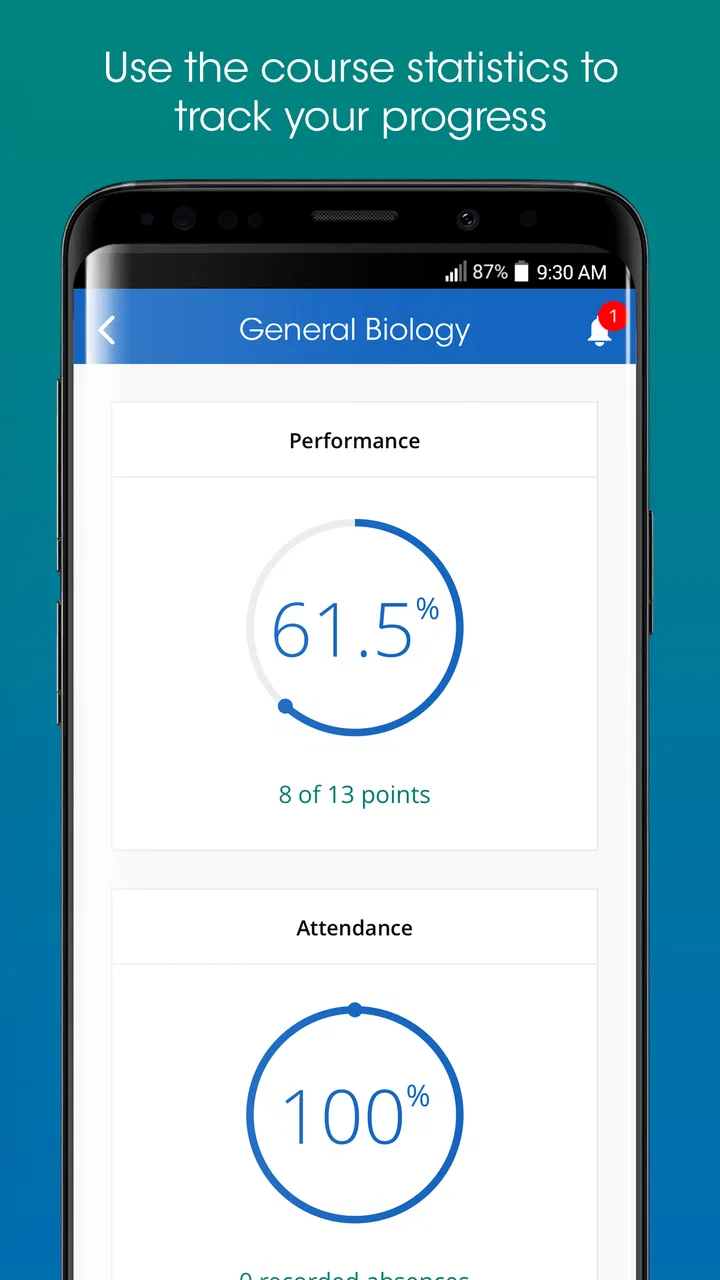
iClicker Student is a classroom participation app that lets students respond to questions during lectures using a smartphone or other supported device. Instructors can display polls, quizzes, and attendance prompts, while students submit answers through the app. It is mainly designed for courses using the iClicker platform, so its usefulness depends on whether your school or teacher has enabled it.
02How do I join a class in iClicker Student?
After installing iClicker Student, you generally sign in with the account or campus credentials requested by your institution, then search for or enter your instructor’s course. Some classes may require a course code, while others appear automatically through a learning management system integration. Make sure you select the correct section, because joining the wrong course can prevent your answers from being recorded properly.
03Does iClicker Student cost money for students?
The cost of iClicker Student depends on how your institution and instructor have configured the course. Some schools provide access at no additional charge, while others may require students to purchase a subscription, access code, or course participation package. Check your syllabus, campus bookstore, or instructor’s instructions before downloading or paying, since pricing and included features can vary.
04Can I use iClicker Student without an internet connection?
iClicker Student normally requires an internet connection to receive live questions and send responses to your instructor. If your connection is weak or unavailable, answers may not be submitted immediately, and participation credit could be affected. Before class, confirm that your phone has reliable Wi-Fi or mobile data, allow the app to connect, and keep it updated to reduce avoidable technical problems.
05What should I do if my answers are not being recorded?
If iClicker Student does not register your responses, first verify that you are signed in to the correct account and enrolled in the correct course. Check your internet connection, confirm that notifications or required permissions are enabled, and restart the app if necessary. If the issue continues, take a screenshot or note the time and contact your instructor or campus support, because participation records are controlled by the course setup.
Pros
- Join classes quickly with a course-specific access code.
- Supports live polls
- quizzes
- and attendance activities in one app.
- Instant feedback helps students check their understanding during class.
- Works with common classroom response systems used by many universities.
- Available for both Android and iOS devices.
Cons
- Some course features require an instructor using compatible iClicker software.
- Account creation and course setup may feel confusing for first-time users.
- Participation can depend on a stable internet or campus network connection.
- App performance may vary across older phones and unsupported operating systems.
- Frequent in-class prompts can be distracting when notification settings are enabled.

iClicker Student
Gallery